Connecting a Epson Printer to Wi-Fi
A general walkthrough for getting a Epson printer onto a home wireless network and printing from a computer or phone.
Last updated 2026-07-30
Before you start
This is general guidance compiled from public documentation. Steps vary between Epson models and
firmware versions — the exact menu names on your printer may differ. Always follow the setup guide
that came with your specific model where the two disagree.
What you need
- The printer, powered on and with cartridges or toner installed.
- Your wireless network name and password. Write them down; they are case-sensitive.
- A computer or phone already connected to the same network.
- A 2.4 GHz network. Many printers do not support 5 GHz networks. If your router advertises both
- under one name, you may need to connect near the router or temporarily separate the bands.
Steps
- Place the printer within good signal range of the router, at least for the initial setup.
- On the printer's control panel, open the network or wireless settings menu and start the wireless
- setup wizard.
- Choose your network from the list of detected names. If it does not appear, confirm the network is
- 4 GHz and that it is broadcasting its name.
- Enter the network password exactly, watching for case and for characters that look similar.
- Wait for the printer to confirm a connection. Most models show a solid wireless indicator or print
- a network configuration page.
- On your computer, add the printer through your operating system's printer settings. On Windows this
- is Settings, then Bluetooth & devices, then Printers & scanners. On macOS it is System Settings,
- then Printers & Scanners.
- If prompted for a driver, download it from the manufacturer's own support site using your exact
- model number. Do not install drivers from third-party download sites.
- On a phone, use your operating system's built-in printing feature and select the printer.
Verify it worked
Print a test page from the printer's own menu, then print a document from your computer. Both must
succeed — a printer-generated test page confirms the hardware, but only a computer job confirms the
network path and driver.
If it does not work
- Restart the printer, the router and the computer, in that order, allowing each to come fully up.
- Confirm the computer and the printer are on the same network. Guest networks and network isolation
- settings on the router will block printing.
- Temporarily disable a VPN on the computer, which can route traffic away from the local network.
- Check whether the router has client isolation or AP isolation enabled, which prevents devices from
- seeing each other.
- Reset the printer's network settings from its menu and repeat the wizard from step 2.
Getting official help
If the printer will not connect after the steps above, the next step is the manufacturer, not us. Use
the support channel printed in the documentation supplied with your printer. We are an independent
publisher, we are not affiliated with Epson, and we do not operate a support line.
Printers referenced in this article
Listed for identification and further reading. We show no prices or availability here — check current details on Amazon. Inclusion is editorial and is not a paid placement.

Epson PictureMate PM-400 Wireless Compact Color Photo Printer, white
- Technology
- Inkjet
- Output
- Color
- Functions
- Scan
- Duplex
- Yes
- Connectivity
- USB, Wi-Fi
- Mono print speed
- 36
- Input capacity
- 50
- Mono resolution
- 5760 x 1440 dpi
View on Amazon Affiliate link. Specifications and availability are shown on Amazon.

Epson EcoTank ET-2720 Wireless Color All-in-One Supertank Printer with Scanner and Copier - White
- Functions
- Copy, Scan
- Mono resolution
- 9600 dots per inch
- Display
- LCD
- Dimensions
- 13.7"D x 14.8"W x 8.7"H
View on Amazon Affiliate link. Specifications and availability are shown on Amazon.

Epson EcoTank ET-2760 Wireless Color All-in-One Cartridge-Free Supertank Printer with Scanner and Copier
- Functions
- All In One
- Input capacity
- 50
- Consumables
- Epson 502 series (502 Cyan, 502 Magenta, 502 Yellow, 502 Black)
- Display
- LCD
- Dimensions
- 13.7"D x 14.8"W x 9.4"H
View on Amazon Affiliate link. Specifications and availability are shown on Amazon.

Epson Workforce Pro WF-4834 Wireless All-in-One Printer with Auto 2-Sided Print Copy, Scan and Fax, 50-Page ADF, 500-sheet Paper Capacity, 4.3" Color Touchscreen
- Functions
- All In One
- Input capacity
- 500
- Consumables
- Epson 822 ink
- Display
- LCD
- Dimensions
- 15.3"D x 16.7"W x 13"H
View on Amazon Affiliate link. Specifications and availability are shown on Amazon.
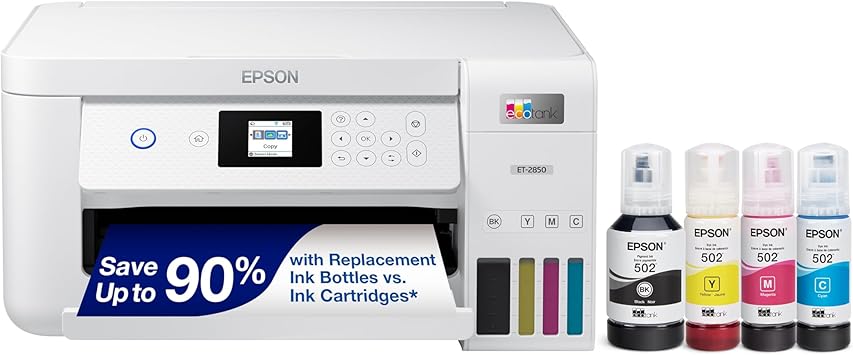
Epson EcoTank ET-2850 Wireless Color All-in-One Cartridge-Free Supertank Printer with Scan, Copy and Auto 2-Sided Printing - White, Medium
- Functions
- All In One
- Duplex
- auto
- Mono resolution
- 4800 x 1200 dpi
- Display
- LCD
- Dimensions
- 14.8"D x 22.3"W x 10.2"H
View on Amazon Affiliate link. Specifications and availability are shown on Amazon.
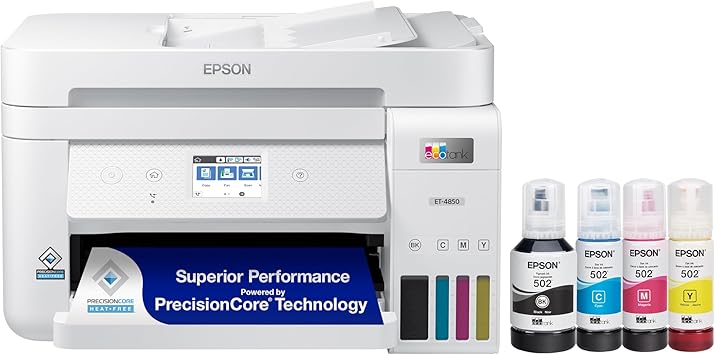
Epson EcoTank ET-4850 Wireless All-in-One Cartridge-Free Supertank with Scanner Copier, Fax, ADF and Ethernet, The Printer Office Printer - White
- Functions
- Copy, Scan
- Input capacity
- 250
- Dimensions
- 16.4"D x 19.8"W x 10"H
View on Amazon Affiliate link. Specifications and availability are shown on Amazon.